What is Imagical.store and what problem does it solve?

Imagical.store is a free stock image platform that serves AI-generated game assets — backgrounds, textures, UI elements, character art, and environment scenes — all available for free download.

The platform was born from a gap I noticed in the game development community: most free asset sites offer either low-quality images or lock everything behind paywalls. Developers building indie games, prototyping environments, or creating mood boards need quick access to high-quality visual assets without friction.

Imagical.store solves this by providing a massive, searchable library of AI-generated game assets — completely free, no account required for browsing, and optimized for fast discovery through full-text search and category-based navigation.

All images on the platform were generated using Gemini Nano Banana, Google's lightweight image generation model, through a custom batch generation pipeline I built. This allowed me to generate thousands of high-quality game assets at scale — across dozens of categories like fantasy landscapes, sci-fi environments, pixel art, and PBR textures — and feed them directly into the platform's upload pipeline.

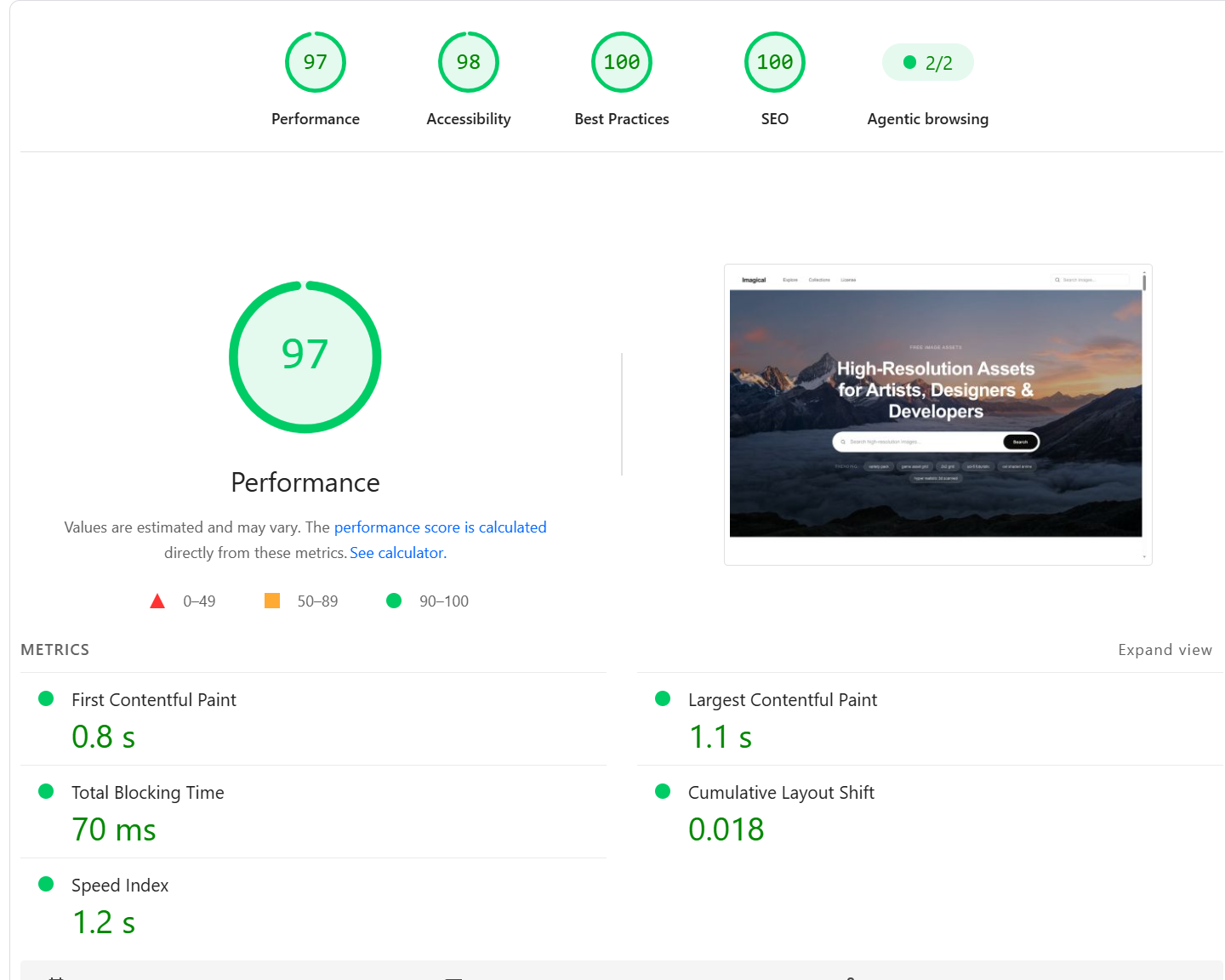
Imagical.store homepage showing a masonry grid of AI-generated game assets with search and category navigation97/100 Lighthouse PageSpeed Insights score for Imagical Store

As you can see from the Lighthouse report, the site achieves near-perfect scores across Performance (97/100), Accessibility (98/100), Best Practices (100/100), and SEO (100/100). Key metrics include:

  • First Contentful Paint (FCP): 0.8 s
  • Largest Contentful Paint (LCP): 1.1 s
  • Total Blocking Time (TBT): 70 ms
  • Cumulative Layout Shift (CLS): 0.018

This sounds like it involves a lot of moving parts. Walk me through the technical architecture — how is everything connected?

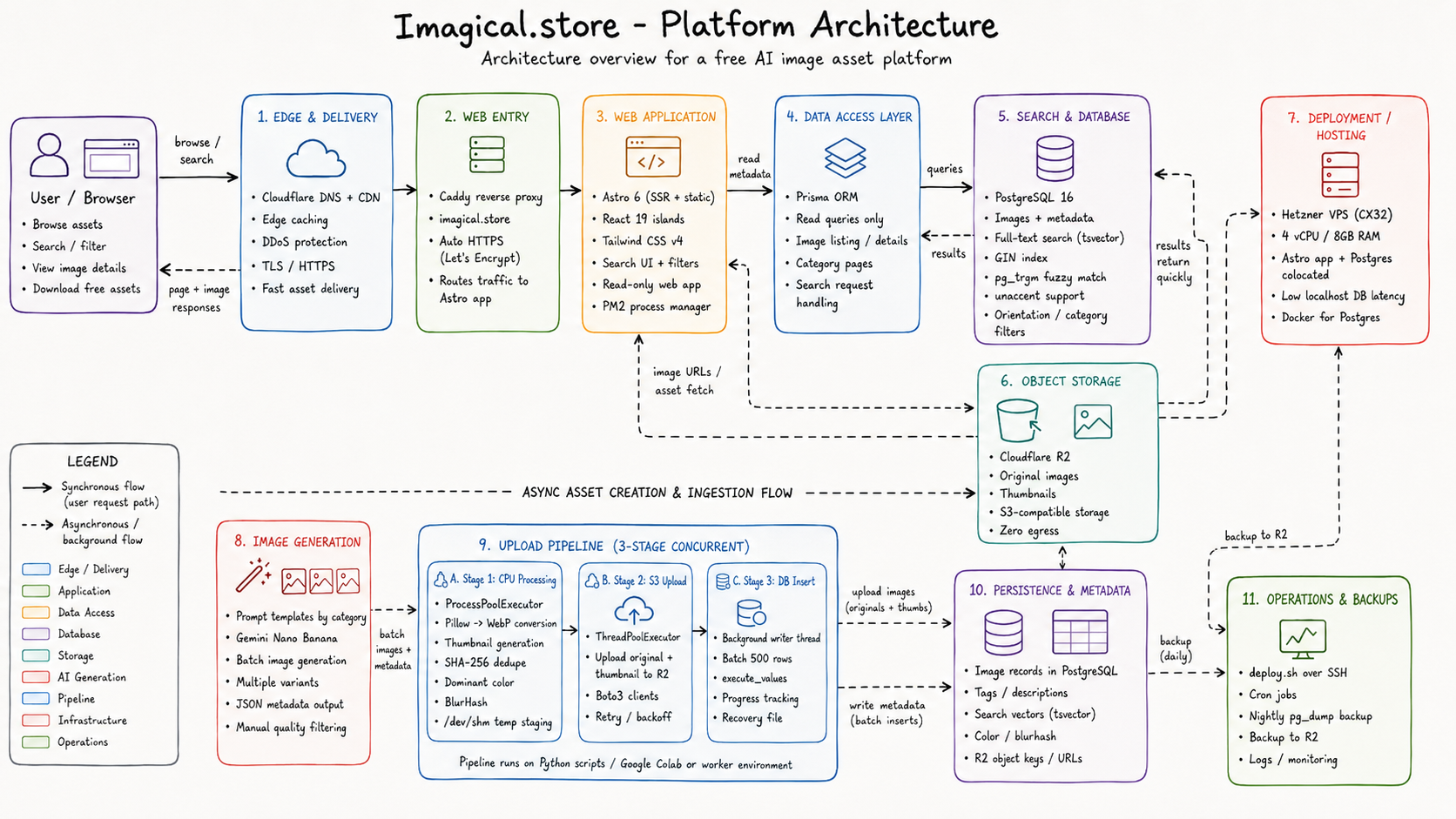
The architecture is built around a key design principle: the web application is read-only. The Astro app never writes to the database or uploads to storage. All write operations happen through a completely separate Python pipeline.

The Stack

LayerTechnologyWhy
FrameworkAstro 6 (SSR + static)Zero JS by default, React islands for interactive UI
UI LibraryReact 19Interactive islands — search bar, image grid, filters
StylingTailwind CSS v4CSS-first config via Vite plugin
ORMPrismaType-safe queries, read-focused
DatabasePostgreSQL 16 (Docker)Full-text search, GIN indexes, pg_trgm for fuzzy matching
StorageCloudflare R2Zero egress costs, S3-compatible
CDNCloudflare (free tier)Edge caching for images and pages
Image GenerationGemini Nano BananaBatch AI image generation for game assets
Image UploadPython scripts (separate)Multi-stage pipeline with ProcessPool + ThreadPool
ServerHetzner VPS (CX32)4 vCPU, 8GB RAM — app, DB, and worker colocated
Reverse ProxyCaddyAuto HTTPS via Let's Encrypt
Process ManagerPM2Keep the Astro app alive, auto-restart on crash

Why Astro?

Astro's hybrid rendering model is perfect for a content-heavy platform like this. Category pages and legal pages are statically pre-rendered — zero JavaScript shipped. Interactive components like the search bar and masonry image grid are hydrated as React islands using client:load or client:visible, so they only load JavaScript when actually needed.

This means a user browsing the homepage gets a near-instant page load with zero JavaScript overhead, and only the search bar and image grid hydrate interactively.

Architecture diagram showing the data flow from Gemini Nano Banana through Python pipeline to R2 and PostgreSQL, served by Astro on Hetzner VPS

You mentioned generating all images with Gemini Nano Banana. How does the batch generation process work?

All images on Imagical.store were generated using Gemini Nano Banana — Google's lightweight, high-throughput image generation model. I chose it specifically because it supports batch image generation, which was critical for building a library of thousands of assets efficiently.

The Generation Workflow

The process works in stages:

  1. Prompt Engineering — I wrote structured prompt templates for each asset category (e.g., "seamless fantasy stone wall texture, top-down game perspective, 4K quality"). Each prompt includes style parameters, aspect ratios, and category metadata.

  2. Batch Generation — Gemini Nano Banana processes these prompts in bulk, generating multiple image variants per prompt. Each generated image comes with a JSON metadata file containing:

    • UUID, title, description, tags
    • Style classification (realistic, stylized, pixel art, etc.)
    • Aspect ratio and batch number
    • The original generation prompt
  3. Quality Filtering — Not every generated image makes it to the platform. I review batches and filter out artifacts, inconsistent styles, or images that don't match the intended category.

  4. Pipeline Handoff — Approved images and their metadata JSONs are staged in a directory structure that the upload pipeline consumes automatically.

The combination of Gemini Nano Banana's batch capabilities with my automated pipeline meant I could generate, process, and publish hundreds of images per session — turning what would be weeks of manual asset creation into hours of automated generation.

The upload pipeline sounds complex. How does it handle processing thousands of images efficiently?

The upload pipeline is a 3-stage concurrent system designed for maximum throughput. I optimized it to run on Google Colab, where I could leverage free GPU instances and high-bandwidth connections to Cloudflare R2.

Stage 1: CPU Processing (ProcessPoolExecutor)

This stage bypasses Python's GIL entirely by running image processing across all available CPU cores:

  • Opens each image with Pillow
  • Converts to WebP format (75% quality, method 4 compression)
  • Generates a 30%-scale thumbnail
  • Computes SHA-256 hash for deduplication
  • Extracts dominant color via BOX resize to 1×1 pixel
  • Generates BlurHash for progressive loading placeholders
  • Writes compressed files to /dev/shm (Linux RAM disk) for zero-latency I/O

Stage 2: S3 Upload (ThreadPoolExecutor — 128 concurrent threads)

Each CPU-completed payload is immediately handed off to an I/O thread:

  • Uploads the compressed WebP original and thumbnail to Cloudflare R2
  • Uses thread-local Boto3 clients with connection pools sized to match the worker count
  • Implements exponential backoff retry logic for transient failures
  • On success, queues the metadata payload for database insertion

Stage 3: Database Batch Insert (Dedicated Background Thread)

A continuously running background thread consumes from a queue and flushes to PostgreSQL:

  • Batches 500 rows at a time using psycopg2.execute_values
  • Tracks progress to a file so the pipeline can resume after interruption
  • Failed inserts are written to a pending_inserts.jsonl recovery file

Performance

On a Google Colab instance, this pipeline processes images at roughly 5-10 images per second end-to-end — including compression, dual upload, and database insertion. For a batch of 10,000 images, the entire pipeline completes in under 30 minutes.

Using Linux's /dev/shm RAM disk for intermediate file staging was a major optimization. Disk I/O on Colab's mounted Google Drive is painfully slow — writing compressed files to RAM instead of disk eliminated the biggest bottleneck in Stage 1.

Search is powered entirely by PostgreSQL full-text search (FTS) — no external search engine like Elasticsearch or Meilisearch. For a platform of this scale, Postgres FTS with proper indexing is more than sufficient and eliminates an entire infrastructure dependency.

The Search Architecture

Every image row in PostgreSQL has a search_vector column of type tsvector. This column is automatically populated by a database trigger whenever the title, tags_text, or description fields are inserted or updated:

sql
CREATE OR REPLACE FUNCTION images_search_vector_update() RETURNS trigger AS $$
BEGIN
  NEW.search_vector :=
    setweight(to_tsvector('english', COALESCE(NEW.title, '')), 'A') ||
    setweight(to_tsvector('english', COALESCE(NEW.tags_text, '')), 'B') ||
    setweight(to_tsvector('english', COALESCE(NEW.description, '')), 'C');
  RETURN NEW;
END;
$$ LANGUAGE plpgsql;

The weighting system ensures titles have the highest ranking priority (weight A), followed by tags (B), then descriptions (C). This means a search for "dragon" will prioritize images explicitly titled "Dragon" over images that merely mention "dragon" in their description.

Indexes

Three indexes work together:

  1. GIN index on search_vector — powers full-text search queries using @@ operator
  2. Trigram index on title — enables fuzzy matching via pg_trgm for typo-tolerant search
  3. unaccent extension — strips accents so "café" matches "cafe"

Query Performance

Search queries use ts_rank_cd for relevance scoring and support orientation filtering (landscape, portrait, square). With GIN indexes, even queries across tens of thousands of rows return in under 10ms on the Hetzner VPS — and that's with the database running on the same machine as the application server, so latency is sub-millisecond for the connection itself.

How is the platform deployed? Why Hetzner VPS instead of Vercel or Cloudflare Pages?

I chose a Hetzner VPS over serverless platforms for several practical reasons:

Why Not Serverless?

FactorHetzner VPSCloudflare Pages / Vercel
Astro SSRFull Node.js runtime, no limitsEdge runtime — limited Node APIs
PrismaNative binary, full supportNeeds adapter hacks for edge
DB latencylocalhost (sub-ms)Remote DB over internet (~20-50ms)
Cost at scaleFixed ~€8/moFree tier → unpredictable spikes
Background jobsSame box, cron + PM2Separate Workers/Queues needed

The biggest advantage is colocation. The app server, PostgreSQL database, and all background jobs live on the same machine. Database queries hit localhost — zero network latency. This eliminates the connection pooling headaches and cold start issues that plague serverless database access.

The Deployment Stack

Internet → Cloudflare CDN (edge caching, DDoS protection) → Hetzner VPS (CX32: 4 vCPU, 8GB RAM) ├── Caddy (:443) → auto-SSL + reverse proxy │ └── imagical.store → Astro Node server (:4321) ├── PM2 → process management, auto-restart ├── PostgreSQL 16 (Docker) │ ├── localhost:5432 → Astro app (internal) │ └── :54321 → Python upload scripts (firewalled) └── Cron → nightly pg_dump backup → R2

Deployment Process

Deployments are a single SSH command:

bash
ssh root@server 'bash /app/deploy.sh'

The deploy script pulls from Git, runs npm ci, executes Prisma migrations, builds the Astro app, and restarts PM2. The entire process takes about 60 seconds.

Monthly Cost

ServiceCost
Hetzner CX32 (4 vCPU, 8GB RAM)~€8/mo
Cloudflare R2 storage~$7-60/mo (scales with storage)
Cloudflare CDN/DNS$0
Domain~$10/year
Total~$20-70/mo

The total monthly cost is predictable and fixed. No surprise bills from serverless function invocations or bandwidth overages. For a platform serving thousands of images, this is significantly cheaper than managed alternatives.

A stock image platform lives and dies by SEO. What's the search engine optimization strategy?

SEO is deeply architected into the platform — not bolted on as an afterthought. For a million-image site, every technical decision has SEO implications.

Server-Side Rendering for Crawlability

Astro ships zero JavaScript by default for static pages. Image detail pages are server-rendered with complete HTML — search engine crawlers get fully rendered content without needing to execute JavaScript. This is the single biggest SEO advantage over SPA-based image platforms.

Structured Data (JSON-LD)

Every image detail page injects ImageObject schema markup:

  • contentUrl — direct CDN URL to the image
  • license — link to the platform's license terms
  • acquireLicensePage — download page URL (targeting Google's "Licensable" badge)
  • creator, description, width, height

Sitemap Strategy

The platform generates segmented XML sitemaps dynamically:

  • sitemap-images/ — chunked by batch, 50K URLs per file
  • sitemap-categories.xml — all category landing pages
  • sitemap-tags/ — all tag pages
  • sitemap-pages.xml — static pages (home, search, legal)
  • sitemap-index.xml — master index linking all sitemaps

Image SEO Specifics

  • All images served as WebP from Cloudflare CDN with immutable cache headers
  • Descriptive file naming via slugs (e.g., fantasy-dragon-landscape-4k.webp)
  • Alt text auto-generated from title + tags
  • loading="lazy" on all below-fold images
  • width and height attributes set to prevent layout shift (CLS)

Internal Search Blocked from Indexation

Search result pages use noindex, follow meta tags — crawlers can follow links to discover images but won't index the search result pages themselves. This prevents index bloat from millions of dynamic search URL combinations.

How does the image storage and delivery work with Cloudflare R2?

Cloudflare R2 was chosen for one critical reason: zero egress costs. For a platform serving millions of image requests, traditional S3 egress fees would be financially devastating.

Storage Architecture

Each image is stored in two variants:

r2-bucket: "imagical-store" ├── images/ │ ├── {slug}.webp ← Compressed original (WebP, 75% quality) │ └── {slug}-thumb.webp ← Thumbnail (30% scale) └── backups/ └── db_{date}.sql.gz ← Nightly database dumps

CDN Delivery

A custom subdomain (cdn.imagical.store) points to the R2 public bucket with Cloudflare proxy enabled. Every image is served with aggressive cache headers:

Cache-Control: public, max-age=31536000, immutable

This tells browsers and CDN edge nodes to cache images for one year. Since image content never changes (each image has a unique slug), this is completely safe and dramatically reduces origin requests.

BlurHash Placeholders

The upload pipeline computes a BlurHash for every image. The frontend uses these to render beautiful gradient placeholders while the actual image loads — providing a premium, instant-feeling browsing experience even on slow connections.

Dominant Color Extraction

Each image's dominant color is extracted during processing (via BOX resize to 1×1 pixel). This is used for:

  • Background color behind images before they load
  • Color-based search filtering (planned feature)
  • Visual consistency in the masonry grid layout

Tell me about the frontend architecture patterns — how is the Astro + React setup organized?

The frontend follows a strict separation of concerns pattern that I documented in detailed coding standards for the project.

The Golden Rule: No Layer Imports Upward

pages/ → can import from: lib/, components/, types/, utils/, config/ components/ → can import from: types/, utils/, config/, stores/ lib/ → can import from: types/, utils/, config/ stores/ → can import from: types/, utils/, config/ utils/ → can import from: types/ ONLY config/ → imports nothing (leaf node) types/ → imports nothing (leaf node)

Pages Are Thin Orchestrators

Astro pages handle routing and data fetching — nothing else. They parse URL parameters with Zod, call into lib/ for data, and pass results to components:

astro
---
import { searchImages } from '@/lib/search/postgres';
import { searchParamsSchema } from '@/types/search';
import ImageGrid from '@/components/images/ImageGrid';
import Layout from '@/layouts/Layout.astro';

const params = searchParamsSchema.safeParse(Astro.url.searchParams);
if (!params.success) return Astro.redirect('/');
const results = await searchImages(params.data);
---
<Layout title={`Search: ${params.data.q}`}>
  <ImageGrid images={results} client:load />
</Layout>

React Islands Strategy

Only interactive components hydrate as React islands:

  • SearchBarclient:load (above the fold, needs instant interactivity)
  • ImageGrid (masonry layout) — client:visible (below the fold, loads when scrolled into view)
  • Static content like category pages, legal pages — zero JavaScript, pure Astro

Module Decoupling

Every major subsystem sits behind an interface/adapter pattern. The payment provider, storage backend, auth system, and search engine can each be swapped without touching the rest of the codebase. This was a deliberate architectural decision — if I outgrow Postgres FTS, I can drop in Meilisearch by implementing a single interface.

The lib/ directory is completely framework-agnostic — zero Astro or React imports. Pure TypeScript. If I ever migrate away from Astro, the entire business logic layer is portable without modification.

What were the biggest technical challenges you faced building this?

Three challenges stood out:

1. Making the Upload Pipeline Resumable

Processing 10,000+ images is not a one-shot operation. Network failures, Colab timeouts, and R2 rate limits mean the pipeline will be interrupted. The solution was a multi-layer progress tracking system:

  • A progress.txt file tracks every successfully processed tracker_id
  • On startup, the pipeline queries the database for all existing slugs to prevent duplicates
  • Failed uploads are written to pending_inserts.jsonl for retry
  • SHA-256 hashing prevents duplicate images even if metadata differs

This means I can kill the pipeline at any point and restart it — it picks up exactly where it left off.

2. Search Relevance at Scale

Getting search results to "feel right" required careful tuning of the PostgreSQL FTS weight system. Early iterations ranked images by title match only, which meant searching for "forest" would show an image titled "Dark Forest" above a much better image with tags "enchanted, forest, mystical, trees" but a title like "Woodland Path."

The weighted A/B/C system (title → tags → description) with ts_rank_cd scoring solved this — but only after several rounds of testing with real queries.

3. Keeping Total Cost Under $80/month

Every infrastructure decision was made with cost in mind. Self-hosted PostgreSQL instead of Supabase ($25+/mo saved). R2 instead of S3 (zero egress). Hetzner instead of AWS/GCP (predictable pricing). Caddy instead of Nginx (simpler config, auto-SSL). No Redis, no managed services, no serverless functions.

The result is a fully functional, production-grade stock image platform running for less than the cost of a single managed database.

What's the current state of the project and what's planned next?

The platform is live at imagical.store with thousands of AI-generated game assets across multiple categories.

What's Live Now

  • Full-text search with fuzzy matching and orientation filters
  • Category and tag-based browsing
  • Masonry grid layout with BlurHash progressive loading
  • Image detail pages with structured data (JSON-LD)
  • Segmented XML sitemaps for SEO
  • CDN-served images with immutable caching
  • RSS feed for new image notifications
  • Complete legal pages (license, privacy, terms)
  • Pinterest integration for social distribution

What's Next

  • User authentication via Better Auth (Google OAuth + email/password)
  • Subscription tiers — free downloads with watermark, paid for originals
  • Stripe/LemonSqueezy payment integration (the interface/adapter pattern is already in place)
  • Download tracking per user with rate limiting by plan
  • Collections — curated groupings of related assets
  • Expanding the image library — scaling the Gemini Nano Banana batch pipeline to generate assets in new categories like 3D textures, UI kits, and icon sets

The project demonstrates end-to-end product engineering: from AI-powered content generation with Gemini Nano Banana through a production-grade pipeline to SEO-optimized delivery. Every layer — from the Python upload scripts to the Astro frontend to the PostgreSQL search engine — was designed, built, and deployed by me as a solo developer.