What is BrowserBound? Why build another PDF and image manipulation tool when so many already exist online?

BrowserBound is a privacy-first suite of over 50 free web-based utilities. Instead of uploading your sensitive files to a remote server for processing, BrowserBound does everything entirely on your local machine.

The inspiration came from a personal pain point. I often needed to merge or compress sensitive documents — like my tax returns, Aadhar card, or bank statements. Every time I used popular online tools, I had to upload my highly confidential PII (Personally Identifiable Information) to a remote server. Even if those sites claimed to delete the data afterward, there was no real guarantee.

I realized there was a massive "Privacy Gap" in online tools. So, I decided to bridge that gap by bringing the power of desktop-grade C++ libraries to the web using WebAssembly (WASM). With BrowserBound, files never leave the device.

BrowserBound PDF Tools Dashboard showing 15+ available tools including Merge, Split, and Organize

How is the platform architected to run everything entirely in the browser?

The platform is built on Next.js 15+ with Tailwind CSS for the frontend, but the real magic happens in the background using Web Workers and WebAssembly.

If I ran heavy PDF parsing or image compression on the main JavaScript thread, the browser UI would completely freeze. To solve this, I designed a strict multi-threaded architecture:

  1. React UI Layer: Handles drag-and-drop, settings, and rendering.
  2. Custom Hooks (use-pdf-worker.ts): Acts as the bridge. It assigns unique request IDs to async operations and manages task resolution.
  3. Web Worker (pdf.worker.ts): Runs in a separate background thread, receiving messages from the hook.
  4. WASM Engine (pdfium.wasm): The compiled binary of Google's PDFium library (~7.7MB) that does the actual heavy lifting.
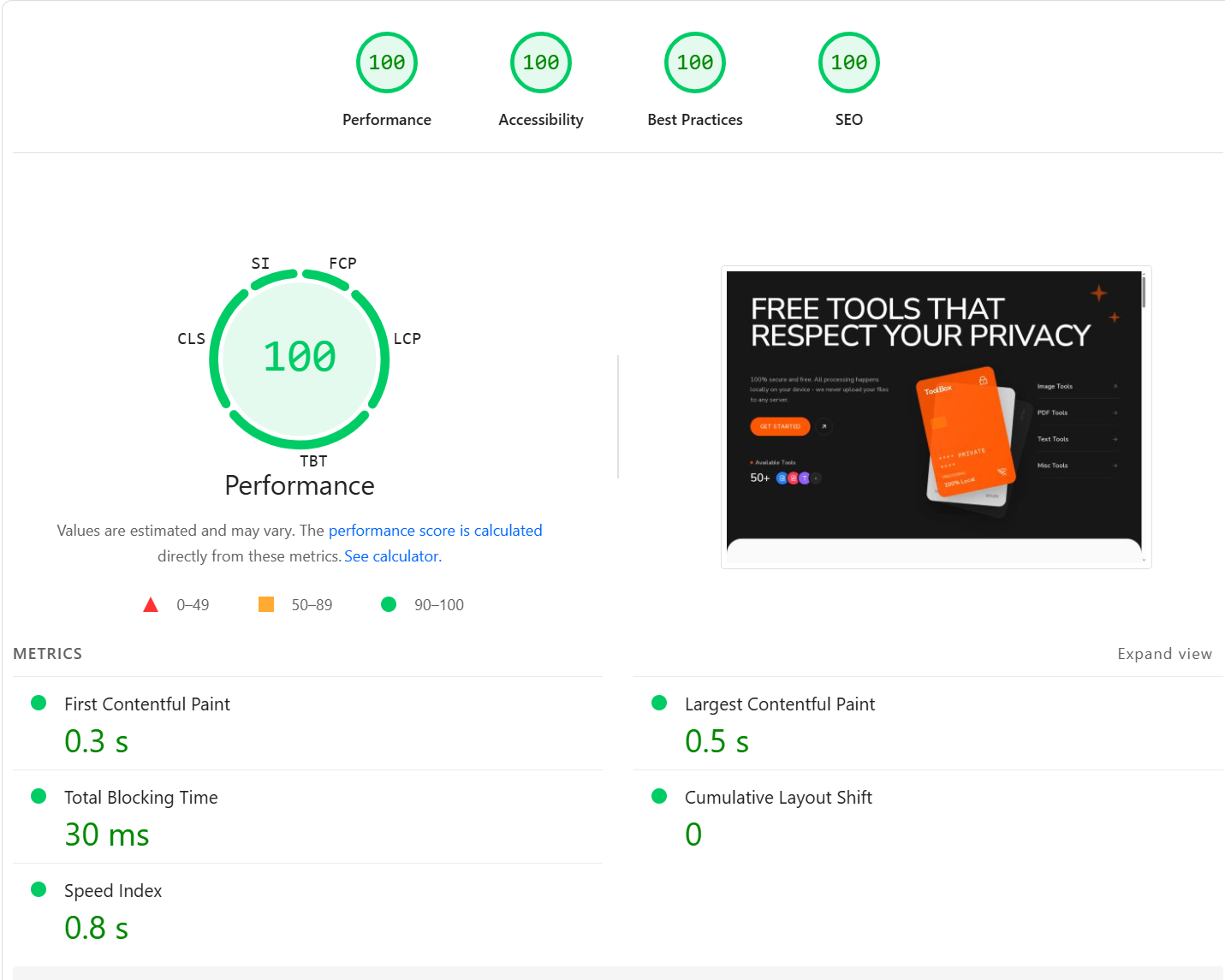
100/100 Lighthouse Performance score for BrowserBound

Despite running complex client-side logic, the Next.js static export coupled with the Web Worker architecture yields perfect 100/100 Lighthouse scores across the board:

  • First Contentful Paint (FCP): 0.3 s
  • Largest Contentful Paint (LCP): 0.5 s
  • Total Blocking Time (TBT): 30 ms

Because the heavy WASM binaries are lazily loaded and executed entirely in a background thread, they never block the main UI thread. This is why the Total Blocking Time is a remarkably low 30 ms, ensuring the platform feels instantly interactive upon loading.

By offloading processing to Web Workers, users can compress a 100MB PDF or batch-process 50 images while the UI remains perfectly smooth and responsive at 60FPS.

Let's talk about the PDF tools. How did you implement things like Merging and Splitting without a backend server?

For PDF manipulation, I utilized PDFium (the open-source PDF rendering engine used by Google Chrome). I took the C++ source code and used Emscripten to compile it into a .wasm binary that the browser could execute natively.

I built a wrapper around it that allows the Web Worker to call C++ functions directly from JavaScript, such as FPDF_LoadMemDocument() and FPDF_ImportPages().

PDF Merger landing zone highlighting Secure & Private, Lightning Fast, and Works Offline features

When a user drops a PDF into the Merger:

  1. The file is read into a Uint8Array memory buffer.
  2. It's passed to the Web Worker.
  3. The WASM engine allocates memory, loads the pages, extracts thumbnails, and returns them to React.
  4. When the user clicks "Merge", the WASM engine creates a new document, imports the selected pages, and exports the final binary — all within milliseconds.
PDF Merger 'Pages' view showing extracted pages that can be visually reordered

What was the hardest technical challenge you faced while working with WebAssembly?

Manual Memory Management.

JavaScript has a garbage collector, but WebAssembly operating on C++ code does not. Every time I loaded a PDF or rendered a thumbnail, I had to manually allocate memory in the WASM heap using wasmExports.malloc(size).

If I forgot to free that memory (wasmExports.free(ptr)) or if an error was thrown before the cleanup code executed, the browser tab would suffer a memory leak. If a user merged 20 large PDFs, a memory leak would quickly crash the tab with an Out-Of-Memory (OOM) error.

I had to build robust try/finally wrappers around every single WASM operation to guarantee that all pointers and bitmaps were destroyed (FPDFBitmap_Destroy(), FPDF_CloseDocument()) regardless of whether the operation succeeded or failed.

You also built an Image Compressor. How does that compare to standard browser Canvas compression?

The native browser Canvas API can convert images to WebP or JPEG, but it's not optimized for file size — it often results in larger files or poor quality.

To achieve "Pro-Grade" compression that rivals tools like TinyPNG or CLI utilities, I integrated multiple WASM codecs:

  • MozJPEG for high-efficiency JPEG encoding
  • OxiPNG for lossless PNG optimization
  • libwebp for advanced WebP control
Image Compressor landing zone showing the drag and drop interface

I built a custom split-screen comparison UI so users can instantly see the quality differences. Because it runs locally, there are no file size limits and zero upload waiting times. You can drop 1,000 images into the queue, and it will churn through them utilizing your device's multi-core CPU via a Worker Pool.

Image Compressor split-screen before/after slider showing a 93% file size reduction

The Image Compressor allows users to fine-tune the exact compression engine (WASM vs Canvas) and manually adjust brightness, contrast, and saturation before exporting.

What is the current traction and future vision for BrowserBound?

BrowserBound is currently live at browserbound.com and serves a steady base of organic daily active users.

The primary target audience includes:

  • Enterprises & Legal Firms dealing with strict compliance (HIPAA, GDPR)
  • Privacy-Conscious Individuals
  • Remote Workers with slow internet speeds who can't afford long upload times
Image Tools dashboard showing compression and various upcoming resizing tools

Unlike competitor SaaS products that lock essential tools behind monthly subscriptions, my vision for BrowserBound is a simple one-time payment for a lifetime "Pro" bundle. It brings the trust and performance of native desktop software straight to the web browser.